
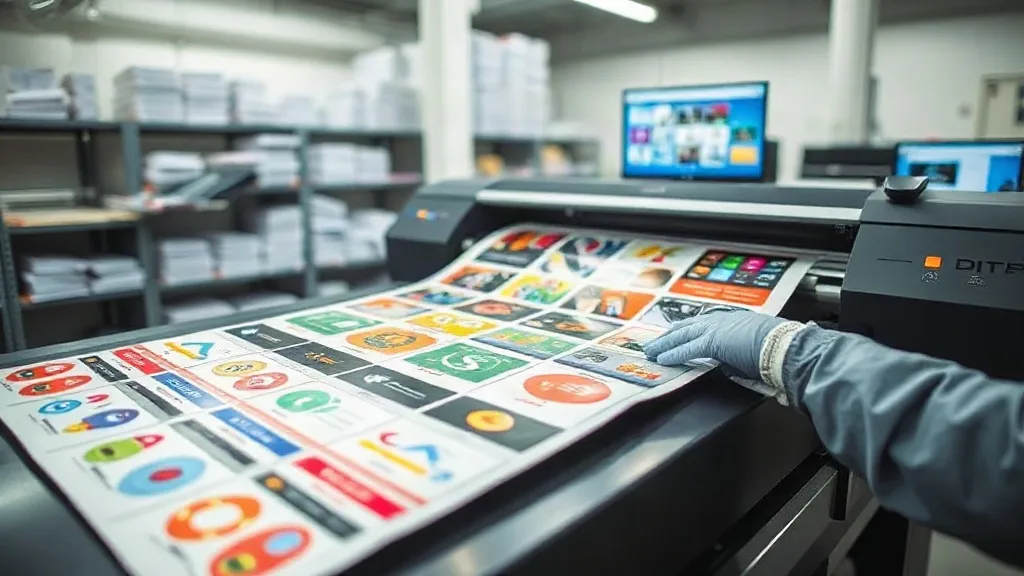
When you run a print shop, the pressure to produce more without dropping quality or burning out your team is constant. You have likely experimented with different methods to streamline operations, but one tool that often gets overlooked is the DTF Gangsheet. This approach to gang printing can be a game changer for scaling your business efficiently. In this article, we will explore how to leverage gangsheets to increase throughput, reduce waste, and maintain high standards, all while keeping your sanity intact.
What Is a DTF Gangsheet and Why It Matters for Scaling
A DTF gangsheet is a large sheet of transfer film that contains multiple designs printed together in a single run. Instead of printing each job individually, you arrange various graphics onto one sheet, maximizing the use of your printer’s width and minimizing downtime. For a growing print shop, this method is essential because it directly addresses the two biggest constraints: time and material cost.
When you print one design at a time, you waste film, ink, and labor on setup and trimming. Gangsheets allow you to fill every inch of the film with sellable transfers, turning what would be wasted space into profit. Moreover, by batching jobs, you reduce the number of printer start-stops, which extends equipment life and stabilizes color output.
How to Plan a Gangsheet That Maximizes Efficiency
Creating a gangsheet is not just about throwing designs onto a canvas. A well-planned sheet requires strategic thinking about order volume, design sizes, and customer deadlines. Here is a step-by-step approach to planning gangsheets that keep your production flowing.
Assess Your Order Queue and Group Similar Jobs
Start by reviewing your pending orders. Group designs by similar ink coverage, color palettes, and film requirements. For example, if you have several orders for dark garments with light-colored designs, you can print them together to reduce color switching and ink waste. Also, consider the due dates: prioritize orders that need to ship soon, but try to fill the sheet with other jobs that can wait a day or two without causing delays.
Optimize Design Placement with Nesting Software
Nesting software is your best friend for gangsheet creation. It automatically arranges designs to minimize gaps, rotate them for better fit, and even suggest the most efficient layout. Invest in a good nesting tool or use the one provided by your DTF supplier. Manual nesting is possible but time-consuming and often less efficient. With software, you can quickly generate a layout that uses at least 90% of the film area, significantly cutting material costs.
Leave Room for Bleed and Cutting
When placing designs, remember to include enough bleed (usually 1-2 mm) around each graphic. This extra space ensures that when you cut the transfers, you do not accidentally trim into the design. Also, plan for cutting paths: if you are using a cutter, leave consistent gaps between designs to allow for clean cuts. A common mistake is to pack designs too tightly, which leads to wasted transfers due to cutting errors.
Common Pitfalls in Gangsheet Printing and How to Avoid Them
Even experienced operators can run into issues with gangsheets. Being aware of these pitfalls can save you time and money.
- Inconsistent Color Across the Sheet: Large gangsheets can sometimes show slight color variations from one side to the other. To avoid this, ensure your printer is properly calibrated and use a consistent color profile. Also, try to group designs with similar color demands together.
- Film Wrinkles and Misfeeds: Loading a large sheet can be tricky. Always handle film with clean gloves, and make sure it is stored flat and away from humidity. If your printer has a vacuum platen, use it to hold the film steady.
- Cutting Errors: If you are cutting by hand, use a sharp blade and a steady hand. For better accuracy, invest in a cutting plotter. And always double-check the cut lines in your design file before printing.
- Overlooking Order Accuracy: With many designs on one sheet, it is easy to lose track of which transfer belongs to which order. Label each design on the sheet with a small code or use a printed map that corresponds to your order list.
Boosting Profitability: The Financial Impact of Smart Gangsheet Use
Let’s talk numbers. Suppose you print a gangsheet that costs $10 in materials (film and ink) and produces 20 transfers that you sell for $5 each. That’s $100 in revenue from $10 in cost, a 90% gross margin. If you had printed those transfers individually, you might have used 30% more film and ink due to waste, reducing your margin. Additionally, labor time is cut because you handle one sheet instead of 20 small runs. Over a month, these savings add up to thousands of dollars.
Furthermore, gangsheets allow you to offer competitive pricing on small orders. Customers often need just a few pieces, and traditional printing methods are not cost-effective for such quantities. With gangsheets, you can group small orders together and still make a profit, attracting more business.
Integrating Gangsheets into Your Workflow: Tips for Smooth Operations
Adopting gangsheets requires some adjustments to your daily routine. Here are practical tips to make the transition seamless.
- Standardize Your Process: Create a checklist for gangsheet creation, from file prep to printing and cutting. This ensures consistency and reduces errors.
- Train Your Team: Make sure everyone understands the importance of nesting, bleed, and labeling. A short training session can prevent costly mistakes.
- Invest in the Right Equipment: A reliable DTF printer with a wide format and a good RIP software are essential. Also, consider a cutting plotter to automate the cutting process.
- Track Your Metrics: Monitor film usage, ink consumption, and turnaround times. Use this data to continuously improve your gangsheet layouts.
Frequently Asked Questions About DTF Gangsheets
How many designs can I fit on a DTF gangsheet?
The number depends on the size of your designs and the width of your film. A typical 24-inch wide sheet that is 36 inches long can hold dozens of small logos or several larger prints. Use nesting software to maximize the count.
Can I mix different fabric types on one gangsheet?
Yes, DTF transfers adhere to a wide range of fabrics, including cotton, polyester, and blends. However, keep in mind that pressing conditions (temperature, pressure, time) may vary slightly by fabric, so you might need to separate transfers for different fabric types during pressing.
What is the best way to store gangsheets before use?
Store them in a cool, dry place away from direct sunlight. Keep them flat or roll them loosely with the printed side facing out to avoid smudging. Use a dust-free environment to prevent particles from settling on the adhesive.
How do I ensure color consistency across a large gangsheet?
Calibrate your printer regularly and use ICC profiles tailored to your printer and ink set. Also, try to group designs with similar color profiles together on the sheet to minimize variations.
Is gangsheet printing suitable for very small orders?
Absolutely. In fact, gangsheets make small orders profitable because you can combine multiple small orders onto one sheet, spreading the setup cost across several jobs.
By mastering the art of DTF gangsheet printing, you can take your print shop to the next level. It is not just about saving money; it is about creating a scalable, efficient operation that can handle growth without chaos. Start small, refine your process, and watch your productivity soar.